Microsoft Paint is Getting a Copilot Button – Here’s What You Need to Know
What is the Copilot Button in Microsoft Paint?
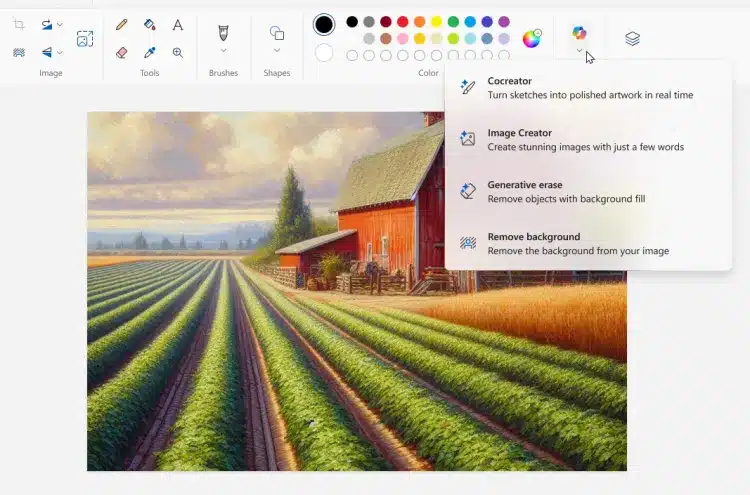
The Copilot button is an AI-powered feature designed to assist users in their creative endeavors within Microsoft Paint. Leveraging advanced algorithms, this tool aims to simplify complex tasks, provide intelligent suggestions, and enhance overall productivity. It’s a significant leap for a program that has traditionally focused on basic image editing and drawing functions.
Key Features of the Copilot Button
- AI-Guided Suggestions: Provides recommendations for colors, patterns, and brush strokes based on the user’s input and context.
- Automated Tasks: Simplifies repetitive actions such as filling areas, resizing images, and applying filters.
- Enhanced Tools: Introduces new drawing and editing tools powered by artificial intelligence to create more professional results.
- User-Friendly Interface: Maintains the simplicity of Microsoft Paint while integrating sophisticated AI features seamlessly.
How Will the Copilot Button Benefit Users?
Whether you’re a casual doodler or a professional artist, the Copilot button brings several advantages:
For Casual Users
If you use Microsoft Paint for simple tasks like editing photos or creating fun drawings, the Copilot can make these activities more enjoyable and less time-consuming. The AI guidance ensures that even those with minimal artistic skills can produce impressive results.
For Professional Artists
Professional users will find the AI tools to be a powerful addition, offering new ways to experiment with designs and streamline workflows. The ability to quickly execute detailed actions and receive intelligent suggestions can significantly enhance productivity and creativity.
What Does This Mean for the Future of Microsoft Paint?
The addition of the Copilot button signifies Microsoft’s commitment to evolving its classic tools to meet modern user needs. By incorporating AI, Microsoft Paint is not just a nostalgic app but a relevant and advanced tool in the current digital landscape. This move could pave the way for more AI integrations in other Microsoft software, further transforming how users interact with technology.
FAQs About the Copilot Button in Microsoft Paint
Is the Copilot Button Free?
Yes, the Copilot button will be available as a free feature in the standard Microsoft Paint application.
When Will the Copilot Button Be Available?
While an exact release date hasn’t been announced, it’s expected to roll out in the upcoming updates for Windows users.
Can I Disable the Copilot Button?
Yes, users who prefer the traditional setup can easily toggle the Copilot button off to continue using Microsoft Paint as they always have.
Conclusion
Microsoft Paint’s new Copilot button is a game-changer, merging the simplicity of a classic tool with the power of AI. Whether you’re looking to enhance your artistic projects or simply want an easier way to edit images, this feature will surely make your experience more efficient and enjoyable. Stay tuned for its release, and get ready to elevate your creativity with Microsoft Paint’s Copilot button!